How to Show or Hide Selection Item Prices
Toggle the visibility of the 'Amount' field on selection items with the "Show item cost" option to create customized, role-based views within your Users and Roles settings."
Written By Stefan S.
Last updated 8 months ago
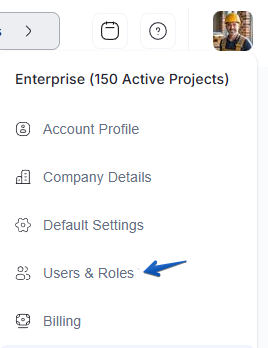
Go to your Account Settings and select Users and Roles.
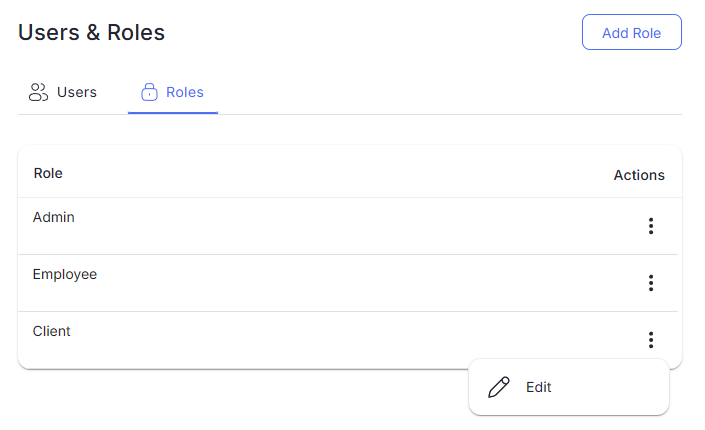
Choose the specific Role you wish to edit.
Scroll down to the Selections permissions section.
Locate the new Show item cost toggle.
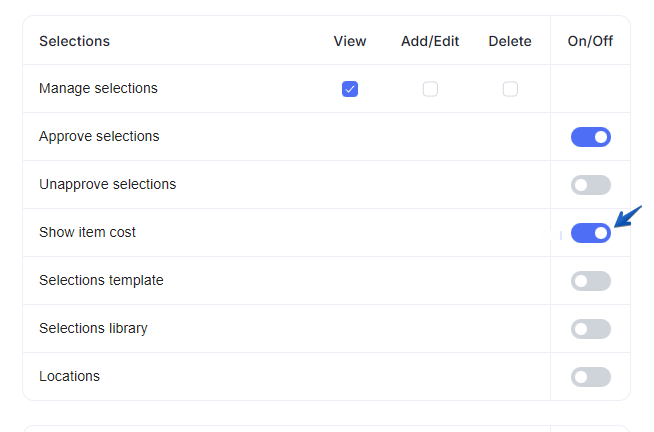
Switch the toggle Off to hide prices or On to make them visible for that role.
Click Save Changes.
When disabled, the "Amount" box will no longer appear on the Selection Item details for users in that role and the item cost will be excluded from the CSV file exports.
Still need help? Ask the team