Stop Payment and Payment Recovery
Sent a payment you need to take back? What you can do depends on whether the payment has started processing yet.
Written By Gilbert
Last updated 1 day ago
Stop early whenever you can. Once payment starts processing, it can only be recovered, not stopped.
Stop a payment before it processes
If the payment has n’t started processing yet, you can stop the whole payment from the invoice.
Open the invoice you paid
Next to the Paid status under Approval Flow, click Stop Payment.
Check the vendor, the amount and the invoices it pays, then click Stop Payment to confirm. Click Keep payment if you change your mind.
Keep the window open while it shows Processing.... Don't close or refresh the page until it finishes.
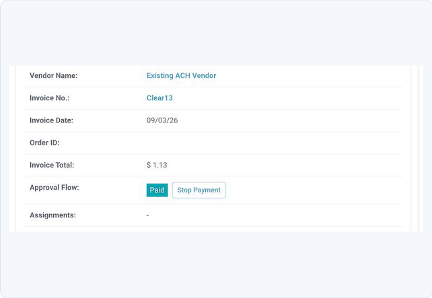
Stop Payment shows next to Paid while the payment hasn't started processing.
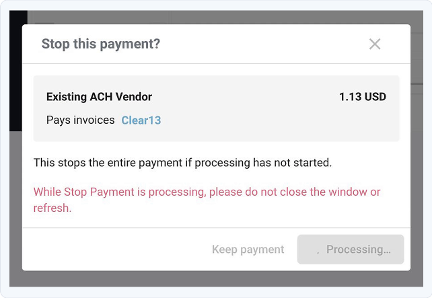
Keep the window open while the stop is processing.
What happens after you stop it
The stop isn't instant. The payment stays locked while the cancellation is checked, then the invoice goes back to Approved.
• Cancellation in progress: the invoice still shows Paid, with "Cancellation in progress" underneath. Click View status to follow it.
• Cancellation confirmed: the invoice returns to Approved, so you can pay it again when you're ready. Any earlier, unrelated payments on the invoice stay applied.
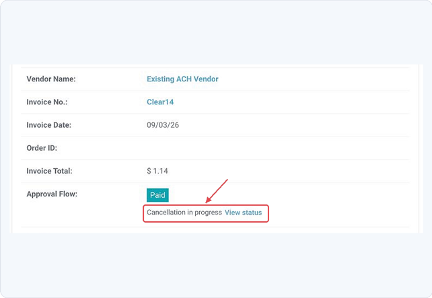
Cancellation in progress: click View status to follow it.
Request recovery after processing has started
Once a payment is processing, Stop Payment is no longer available. Instead, you can ask our team to try to recover it.
1. Open the invoice you paid.
2. Next to the Paid status under Approval Flow, click Request payment recovery.
3. Review the request. It shows the vendor, the amount and the invoices the payment covers.
4. Click Request recovery to send it, or Keep payment to leave the payment as it is.
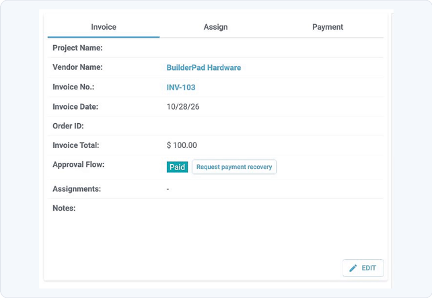
Request payment recovery replaces Stop Payment once processing has started.
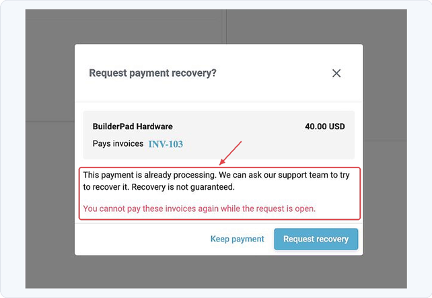
Review the request, then click Request recovery.
Before you send it, keep in mind:
• Recovery is not guaranteed. Our team will try, but the money may already be on its way to the vendor.
• The invoices stay locked while the request is open, so you can't pay them again until it's resolved.
Track your recovery request
After you send the request, our team checks whether the payment can be recovered and lets you know either way. You can follow its progress on the invoice's Payment tab, under Recovery request.
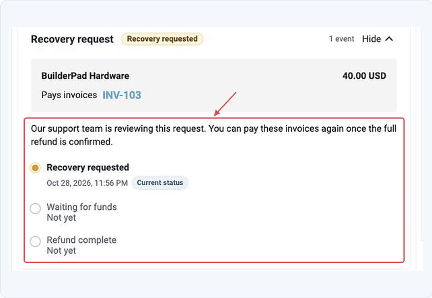
A new request starts at Recovery requested.
If recovery succeeds, the request shows Refund complete and the normal payment options (Pay Now and Mark As Paid) come back.
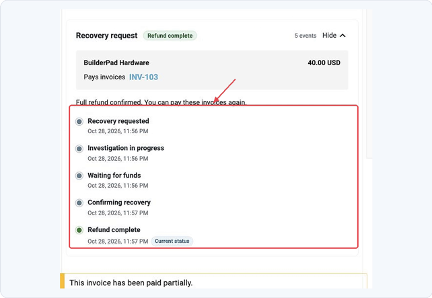
Refund complete: you can pay the invoices again.
If recovery isn't possible, the request shows Not possible and the original payment stays recorded on the invoice. Click Contact support if you need more help.
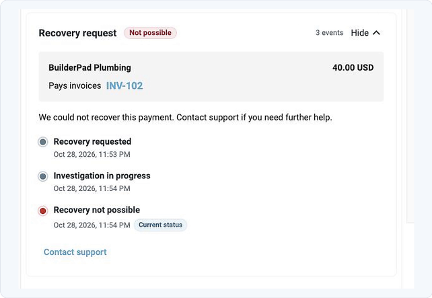
Not possible: the original payment stays recorded.
See the full history
Every stop and recovery request is saved on the invoice, so you can check what happened at any time.
1. Open the invoice and go to the Payment tab.
2. Find Stop payment request or Recovery request.
3. Click Details to see each step with its date and time. Click Hide to collapse it again.
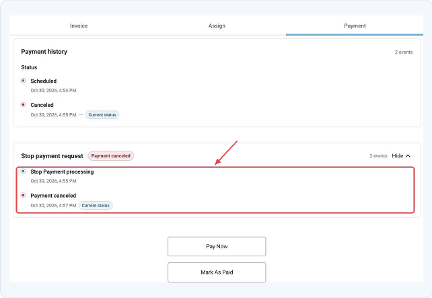
Open Details to see each step with its date and time.
The history stays visible even after the request is finished, including the original request and every step after it.
FAQ
Which option should I use?
Which option should I use?
If the invoice shows a Stop Payment button, use that. If it shows Request payment recovery instead, the payment has already started processing.
Can I stop just one invoice from a payment that covers several? No
Can I stop just one invoice from a payment that covers several? No
Stop Payment and recovery both apply to the whole payment and every invoice it covers.
Can I pay the invoice again while a request is open?
Can I pay the invoice again while a request is open?
Not yet. The invoices stay locked until the stop is confirmed or the full refund is confirmed.
Is recovery guaranteed?
Is recovery guaranteed?
No. Our team will try, and we'll let you know whether it worked. If it didn't, the original payment stays recorded and you can contact support for help.
Questions? Reach us anytime at support@builderpad.com.
Was this helpful?
Still need help? Ask the team